<?xml version="1.0" encoding="utf-8"?><feed xmlns="http://www.w3.org/2005/Atom" ><generator uri="https://jekyllrb.com/" version="4.4.1">Jekyll</generator><link href="https://anil.net.in/blog/feed.xml" rel="self" type="application/atom+xml" /><link href="https://anil.net.in/blog/" rel="alternate" type="text/html" /><updated>2026-09-20T18:53:17+05:30</updated><id>https://anil.net.in/blog/feed.xml</id><title type="html">Reconfigure</title><subtitle>Notoriously resistant to (for practical purposes, afraid of) change.</subtitle><entry><title type="html">Window maker and dockapps nostalgia</title><link href="https://anil.net.in/blog/2019/01/window-maker-and-dockapps-nostalgia.html" rel="alternate" type="text/html" title="Window maker and dockapps nostalgia" /><published>2019-01-10T22:27:56+05:30</published><updated>2019-01-10T22:27:56+05:30</updated><id>https://anil.net.in/blog/2019/01/window-maker-and-dockapps-nostalgia</id><content type="html" xml:base="https://anil.net.in/blog/2019/01/window-maker-and-dockapps-nostalgia.html"><![CDATA[<figure style="float: right; margin: 0 20px 0 20px; width: 64px">

<img src="/blog/wp-content/uploads/2019/01/wmapcups.png" width="64" height="64" />
<figcaption width="64">wmapcups</figcaption>
</figure>

<p>Tried a bit of nostalgia driven "comfort" programming making
<a href="https://github.com/aniline/wmapcups">wmapcups</a>. It is a <a href="https://www.windowmaker.org/">Window
Maker</a> dockapp that presents the status of
an <a href="https://www.apc.com/">APC</a> UPS via the
<a href="http://www.apcupsd.org/">apcupsd</a>.</p>

<p>Window maker itself is a bit dated compared to the 'desktop managers'
these days but it is fast if can look past that. If your keyboard sees
more action than your mouse and you don't want to to overboard with
<a href="https://en.wikipedia.org/wiki/Tiling_window_manager">tiling window
managers</a> this is a
good trade off. I use window maker at work on one of the older PCs while
the newer ones run <a href="https://xfce.org/">xfce4</a>. I use dockapps under Xfce
through a panel plugin called
<a href="https://goodies.xfce.org/projects/panel-plugins/xfce4-wmdock-plugin">xfce4-wmdock-plugin</a>
which gobbles up <a href="https://en.wikipedia.org/wiki/X_Window_System">X11</a>
programs that provide the hints that they are dockapps.</p>

<figure style="display: block; margin: 20px auto 20px auto; align: center; width: 300px">

<img src="/blog/wp-content/uploads/2019/01/xfce-dockapp.jpg" width="300" height="52" />
<figcaption width="300">My running dockapps in xfce4 panel plugin.</figcaption>
</figure>

<p><a href="https://en.wikipedia.org/wiki/Dockapp">Dockapps</a> are widget-ey programs
with UI made of a small square (64x64 or 48x48 pixels) mostly presenting
some information. Most dockapps would serve some purpose now handled by
panel (or taskbar) plugins except they have the same consistent
'square' tile feel. The whole 'style' of window maker and dockapps
is inherited from the <a href="https://en.wikipedia.org/wiki/NeXTSTEP">NextSTEP</a>
OS.</p>

<p>To write a dockapp, some familiarity with X11 programming would be
useful. However its quite simple to glean the essence of it from the
<a href="http://repo.or.cz/w/dockapps.git">existing dockapp sources</a>. Also there
is library called <a href="https://www.dockapps.net/libdockapp">libdockapp</a> that
wraps up the most common pattern used in the sources. For pythonistas
there is a <a href="https://sourceforge.net/projects/pywmdockapps/">module</a> for
writing dockapps as well (I've not tried it yet).</p>

<p>Window maker development was dead for many years during before being
started up again in 2012. The current team <a href="https://www.windowmaker.org/dev/">accepts
patches</a> for window maker and few
orphaned dockapps that they've adopted.</p>]]></content><author><name>{&quot;display_name&quot;=&gt;&quot;Anil&quot;, &quot;login&quot;=&gt;&quot;Anil&quot;, &quot;url&quot;=&gt;&quot;&quot;}</name></author><category term="Leftbrain" /><category term="Rightbrain" /><category term="Linux" /><category term="Linux" /><category term="x11" /><category term="Nostalgia" /><category term="window maker" /><category term="dockapps" /><summary type="html"><![CDATA[wmapcups]]></summary></entry><entry><title type="html">Wifi CLIP Thingy</title><link href="https://anil.net.in/blog/2016/03/wifi-clip-thingy.html" rel="alternate" type="text/html" title="Wifi CLIP Thingy" /><published>2016-03-05T00:35:47+05:30</published><updated>2016-03-05T00:35:47+05:30</updated><id>https://anil.net.in/blog/2016/03/wifi-clip-thingy</id><content type="html" xml:base="https://anil.net.in/blog/2016/03/wifi-clip-thingy.html"><![CDATA[<p>Forgive me for the click-bait summary. Well, what I said there is not
entirely false.</p>

<p>Its been more than just more than a year since I re-started my
electronics hobby (since some 16 years ago, I guess). Around that time
(1 year, not 16 years) an <a href="http://www.dharmanitech.com/2008/07/hi-friends-one-more-circuit-dtmf.html">oldish DIY project
article</a>
on the Internet clued me in that caller ID was transmitted as DTMF tones
(in India). It was true, I even could read the info with
<a href="http://parts.io/search/term-CM8870">CM8870</a>. Within a a couple of
months I noticed that the
<a href="https://en.wikipedia.org/wiki/Dual-tone_multi-frequency_signaling">DTMF</a>
business was not working but my phone was displaying the info - which
means the exchange did not disable the feature. This meant they switched
the signaling. Couple of experiments with an
<a href="https://en.wikipedia.org/wiki/Operational_amplifier">opamp</a> and
<a href="https://en.wikipedia.org/wiki/Digital_storage_oscilloscope">DSO</a> proved
it - they were <a href="http://www.epanorama.net/documents/telecom/cid_bellcore.html">using
FSK</a>
(<a href="https://en.wikipedia.org/wiki/Frequency-shift_keying">wiki</a>)</p>

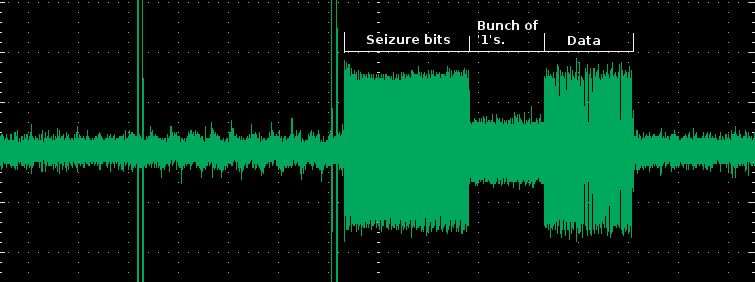
<figure style="display: block; margin: 20px auto 20px auto; align: center; width: 300px">

<img src="/blog/wp-content/uploads/2016/03/CLIP_Signal.png" width="300" height="112" />
<figcaption width="300">The 3 portions of the CLIP signaling.</figcaption>
</figure>

<p>Then came the futile attempt to demodulate it using a <a href="http://www.ti.com/lit/ds/symlink/cd4046b.pdf">CD4046
(PLL)</a>. Lot of trial and
error but could not get clean bits out of it - something to do with
lousy low pass filter design. After some googling I came to the
standalone decoder chip
<a href="http://www.holtek.com/english/docum/comm/9032.htm">HT9032</a>. It does the
demodulation and gives us plain logic output. There are two variants of
this chip, the 'C' and 'D' - the D version is the smaller one with
8pins but does not offer ring detection (that has to be done
separately).</p>

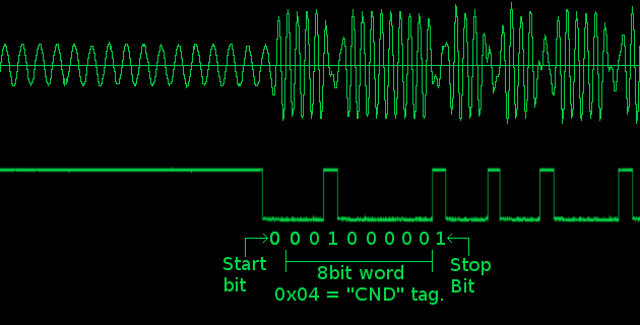
<figure style="display: block; margin: 20px auto 20px auto; align: center; width: 300px">

<img src="/blog/wp-content/uploads/2016/02/CND_msg.png" width="300" height="152" />
<figcaption width="300">Portion of the FSK signal (at the boundary of the
stretch of \'1\'s and the data)</figcaption>
</figure>

<h2 id="hardware">Hardware</h2>

<p>There are four blocks in the circuit</p>

<figure style="display: block; margin: 20px auto 20px auto; align: center; width: 300px">

<img src="/blog/wp-content/uploads/2016/03/blocks-1.png" width="300" height="139" />
<figcaption width="300">There is always a block diagram !!! (POTS =
telephone line)</figcaption>
</figure>

<ol>
  <li>FSK Demodulator which converts the FSK signal to stream of UART like
bits</li>
  <li>Ring detector which give a logic high when the high voltage ring
signal arrives.</li>
  <li>Caller ID message (CND) Parser which pulls out the data fields from
frame of data</li>
  <li>Wifi interface that dispatches the info for fun and profit.</li>
</ol>

<h3 id="the-telephone-decoupling">The Telephone decoupling</h3>

<figure style="float: right; margin: 0 20px 0 20px; width: 150px">

<img src="/blog/wp-content/uploads/2016/02/xformer_revenge-150x150.jpg" width="150" height="150" />
<figcaption width="150">Transformer\'s revenge. I had pulled
out a fallen transformer (from an ADSL splitter for first experiment -
its not a 1:1 transformer).</figcaption>
</figure>

<p>The telephone lines (called <a href="https://en.wikipedia.org/wiki/Tip_and_ring">TIP and
RING</a>) don't have ground
reference so we can't really stick it on to one of our chips (unless it
knows what its doing). One usually has to use a 1:1 transformer with
(600 ohm facing the PSTN line) to get the signal - I've used one of
those to get the audio signal for HT9032 to devour. The ring detection
is separated using an opto-coupler (4N35, its a 'jelly-bean' variety I
think).</p>

<p>I once tried not using the 1:1 transformer and instead using just
capacitors - all sort of noise from micro-controllers went back up the
line - so, that's not a good way to do it.</p>

<h3 id="key-interconnects">Key interconnects</h3>

<ul>
  <li>The ring detector output (from the LM393) goes to the ATTiny84 PA1
(Port A, bit D1)</li>
  <li>Demodulated logic stream from HT9032 goes to ATTiny84 PA2.</li>
  <li>The unpacked number info (or error) goes from ATTiny's PA0 to the
UART0 RX of the ESP8266 module.</li>
</ul>

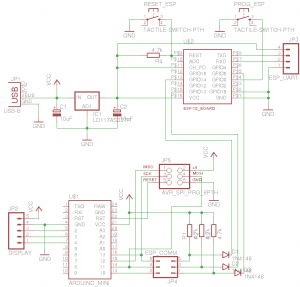
<figure style="display: block; margin: 20px auto 20px auto; align: center; width: 300px">

<img src="/blog/wp-content/uploads/2016/03/schematic_ht9032_portion.png" width="300" height="158" />
<figcaption width="300">A portion of the schematic. Click the
pic for the full schematic.</figcaption>
</figure>

<p>There is a jumper on the ESP's UART0 RX line to select between ESP's
serial programming input and the ATTiny's output.</p>

<h2 id="software-cnd-parsing">Software CND parsing</h2>

<p>The message frame that comes from the demodulator mostly carries only
one type of message the 'CND' (Caller Number Delivery). Telephone
company may provide other kind of services for e.g. CNAM (not seen any
of those). I used an Arduino™ clone in the first prototype to parse the
message and send it for further processing. I later used an
<a href="http://www.atmel.com/devices/attiny84.aspx">ATTiny84</a> micro-controller.
The parser is not stable as the logic stream is not rock solid in pulse
width as a typical UART signal (although the framing is same). I've
added lot of fuzzy guess work to figure out the bits (You can check out
the <a href="https://github.com/aniline/wifi_pstn_cid_fw/blob/master/avr_ht9032/main.c">source
code</a>
and suffer).</p>

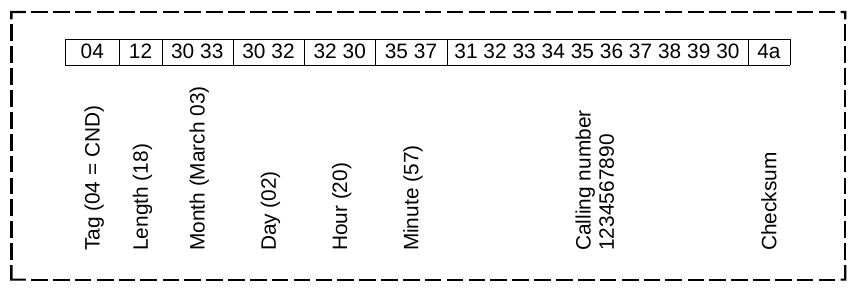
<figure style="display: block; margin: 20px auto 20px auto; align: center; width: px">

<img src="/blog/wp-content/uploads/2016/03/CNDmessage.png" width="" height="174" />
<figcaption width="">CND Message. The message bytes are in hex - the
date, time and number are ASCII text. Summing up all the bytes including
the checksum should have remainder of 0 when divided by 256 (Which I
don\'t do in the code).</figcaption>
</figure>

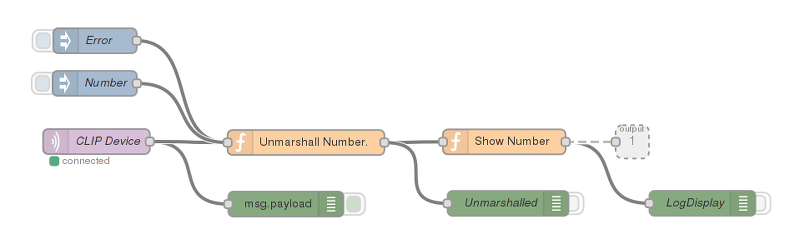
<h2 id="forwarding-over-wifi">Forwarding over WiFi</h2>

<p>The <a href="http://espressif.com/media_overview/news/espressif-wins-internet-things-201516-awards">star of 2015
ESP8266</a>
does the job of forwarding the CLIP info. I've continued the use of
<a href="http://raspberrypi.org/">Raspberry-Pi</a> and
<a href="http://nodered.org/">Node-Red</a> + <a href="http://mosquitto.org/">mosquitto</a>
combination I mentioned in my <a href="https://anil.net.in/blog/?p=334">earlier post about dot-matrix
display</a>. This time the ESP
"publishes" the information to (or 'as' ?) the topic <em>/clipdev</em> on
the MQTT agent running on the Raspberry Pi. A sample flow available at
<a href="https://gist.github.com/aniline/54061e72741135e89d5a">aniline/clip_display_flow.json</a>
does that and sends it to the dot-matrix display. If you want to try it
you can copy the JSON text and paste it in new flow sheet on the NodeRed
UI. After that you can select the portion that grabs the CLIP info and
save it as a sub-flow or attach other elements to it.</p>

<figure style="display: block; margin: 20px auto 20px auto; align: center; width: px">

<img src="/blog/wp-content/uploads/2016/03/Grab_Clip_Node_Red.png" width="" height="159" />
<figcaption width="">Portion of the CLIP grabbing flow. Why
make a single function when you could have fun with all those boxes.</figcaption>
</figure>

<h2 id="some-fixing-needed-what-next-etc">Some fixing needed, what next, etc.</h2>

<ul>
  <li>Reliability (read usability): The de-modulator spew out wrong bits
occasionally.</li>
  <li>Power supply regulation is non-existent on the existing prototype
and right now I run it using a mobile phone charger with a USB
micro-B connector at its end.</li>
  <li>There are lots of 'defensive' / conservative telephone decoupling.
It could lose some zener diodes and capacitors.</li>
</ul>

<p>This happens to be my first more involved use of
<a href="http://kicad-pcb.org/">Kicad</a>. Had made a couple of symbols,
foot-prints and 3D models for this. They are available on github (links
below).</p>

<h2 id="links">Links</h2>

<ul>
  <li>Hardware files (Kicad) :
<a href="https://github.com/aniline/wifi_pstn_cid">aniline/wifi_pstn_cid</a></li>
  <li>Firmware files (AVR and ESP8266):
<a href="https://github.com/aniline/wifi_pstn_cid_fw">aniline/wifi_pstn_cid_fw</a></li>
  <li>My basket of kicad schematic symbols (not too many, I guess I'll
adding to it):
<a href="https://github.com/aniline/akn-kicad-libs">aniline/akn-kicad-libs</a></li>
  <li>Related foot prints:
<a href="https://github.com/aniline/akn_transformers.pretty">aniline/akn_transformers.pretty</a>,
<a href="https://github.com/aniline/akn_misc.pretty">aniline/akn_misc.pretty</a></li>
  <li>And 3D models (sometimes I think this is as equally fun as the rest
of the project):
<a href="https://github.com/aniline/akn.3dshapes">aniline/akn.3dshapes</a></li>
</ul>

<p>There are a bunch of nice articles on various methods of interfacing
here:</p>

<ul>
  <li><a href="http://www.epanorama.net/circuits/teleinterface.html">http://www.epanorama.net/circuits/teleinterface.html</a></li>
  <li><a href="http://www.rane.com/note150.html">Interfacing Audio and POTS, Dennis Bohn, Rane
Corp.</a></li>
  <li>DTMF CLIP project (CC Dharmani' blog): <a href="http://www.dharmanitech.com/2008/07/hi-friends-one-more-circuit-dtmf.html">Design Caller ID using DTMF
decoder
MT8870</a></li>
  <li>Talks of other FSK messages: <a href="https://hkn.eecs.berkeley.edu/~drake/callsense/callerid.html">Caller ID Basics by Michael W.
Slawson</a></li>
</ul>]]></content><author><name>{&quot;display_name&quot;=&gt;&quot;Anil&quot;, &quot;login&quot;=&gt;&quot;Anil&quot;, &quot;url&quot;=&gt;&quot;&quot;}</name></author><category term="Leftbrain" /><category term="BSNL" /><category term="esp8266" /><category term="electronics" /><category term="telephone" /><category term="callerid" /><category term="avr" /><summary type="html"><![CDATA[PSTN Caller-ID to Wifi thingamabob: A gadget for the ultimate couch-potato; If dragging your lazy bottom to pick up your land phone only to learn that its a tele-marketing call causes all sorts of chemical and physical effects around you - this might help.]]></summary></entry><entry><title type="html">MQTT Display</title><link href="https://anil.net.in/blog/2015/06/mqtt-display.html" rel="alternate" type="text/html" title="MQTT Display" /><published>2015-06-12T12:16:27+05:30</published><updated>2015-06-12T12:16:27+05:30</updated><id>https://anil.net.in/blog/2015/06/mqtt-display</id><content type="html" xml:base="https://anil.net.in/blog/2015/06/mqtt-display.html"><![CDATA[<p>I had been fooling around cheap
<a href="http://espressif.com/en/products/esp8266/">ESP8266</a> based modules.
Running HTTP server to do the network end of module. It never felt right
because it felt too heavy and clunky, the web server, often having
trouble with concurrent connections. However the combination of
<a href="http://nodered.org/">Node-Red</a> and MQTT really looks promising -
learned it from <a href="http://tech.scargill.net/">Peter Scargill's blog</a>. I
used <a href="https://github.com/tuanpmt/esp_mqtt">tuanpt/esp_mqtt</a> and a <a href="https://github.com/aniline/arduino-sketchbook/tree/master/mqtt_display">Max
7219 based dot matrix
driver</a>
on arduino to build an MQTT display. So it subscribes to topic like
<code class="language-plaintext highlighter-rouge">/leddisp1/show</code> and various kinds of messages (though I had originally
meant for it to show caller-id info for my wired phone).</p>

<p>::: {.wp-caption .aligncenter style=”width: 320px;”}</p>
<figure style="text-align: center; margin: 20px auto 20px auto">
  <video style="display: block; margin: 2px auto 2px auto; align: center" controls="" src="/blog/wp-content/uploads/2015/06/mqtt_display.mp4" width="auto" height="240">
    No video support.
  </video>
  
  <figcaption></figcaption>
  
</figure>

<p>Display running
:::</p>

<p>The board itself is a kludge and you'd find lot of connectors left open
for experimentation. The ESP8266 module communicates with the <a href="http://www.arduino.cc/en/Main/ArduinoBoardProMini">Arduino
Pro Mini</a> clone (5V,
16 Mhz) via SPI with ESP acting as master (and does the clocking). You
can see really ugly diode based level shifting, which did work on bread
board prototype but broke on the PCB I made. The dot-matrix I've got
display is a set of 6 daisy chained Max7219 based 8x8 single color
displays.</p>

<figure style="display: block; margin: 20px auto 20px auto; align: center; width: 300px">

<img src="/blog/wp-content/uploads/2015/06/esp_mqtt_schematic-300x287.png" width="300" height="287" />
<figcaption width="300">Schematic (Click)</figcaption>
</figure>

<p>The display would show stuff you publish as payload on the topic
<code class="language-plaintext highlighter-rouge">/leddisp1/show</code> Also the payload has a format like <code class="language-plaintext highlighter-rouge">,,</code> where <em>m</em> is
the number of seconds the display should be showing the message, <em>n</em> is
an option telling the display to scroll (when its value is "1") and
not to scroll (when its value is "0"). So you can do something like
the following on Linux:</p>

<div class="language-plaintext highlighter-rouge"><div class="highlight"><pre class="highlight"><code>bash$ mosquitto_pub -h MQTT-broker-hostname -p MQTT-port \
-m "5,1,Kake is a lie" -t /leddisp1/show
</code></pre></div></div>

<p>In my setup Node-Red and <a href="http://mosquitto.org/">MQTT broker
(mosquitto)</a> run on a Raspberry-Pi, which felt
just right. Although Node-Red is not really necessary it lets you wire
the display up in crazy ways. For instance, couple of clicks and I had a
the display showing current time.</p>

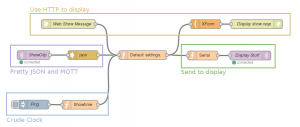
<figure style="display: block; margin: 20px auto 20px auto; align: center; width: 300px">

<img src="/blog/wp-content/uploads/2015/06/led_display_flow-300x127.png" width="300" height="127" />
<figcaption width="300">LED Display flow for Node-Red.</figcaption>
</figure>

<p>My 'test' flow is shown in the picture above. I've marked some
'sub-flows' like 'serializing' a JSON payload to the display's
message format (mentioned above) marked in green. There is a pretty MQTT
topic which accepts JSON payload. There is an HTTP element which you can
use to display stuff by making a request like, say:</p>

<p><code class="language-plaintext highlighter-rouge">http://noderedhost:1880/dispshow?text=Aaappi&amp;option=1</code></p>

<p>Since the picture itself does tell you whats inside the elements, I've
pasted the flow
<a href="https://gist.github.com/aniline/3da423a45716bf1479c4">aniline/led_display_flow.json</a></p>

<h3 id="references-code-and-stuff">References, code and stuff.</h3>

<ul>
  <li>Tuan's MQTT library:
<a href="https://github.com/tuanpmt/esp_mqtt">tuanpmt/esp_mqtt</a></li>
  <li>Peter Scargill's blog:
<a href="http://tech.scargill.net/">tech.scargill.net</a></li>
  <li>Code for Arduino part:
<a href="https://github.com/aniline/arduino-sketchbook/tree/master/mqtt_display">aniline/arduino-sketchbook/mqtt_display</a></li>
  <li>Code for ESP part:
<a href="https://github.com/aniline/esp_mqtt_display">aniline/esp_mqtt_display</a></li>
  <li>Schematic and board files:
<a href="https://anil.net.in/blog/wp-content/uploads/2015/06/ESP-AVR-Display.zip">ESP-AVR-Display.zip</a></li>
  <li>Node-Red test flow:
<a href="https://gist.github.com/aniline/3da423a45716bf1479c4">aniline/led_display_flow.json</a></li>
</ul>]]></content><author><name>{&quot;display_name&quot;=&gt;&quot;Anil&quot;, &quot;login&quot;=&gt;&quot;Anil&quot;, &quot;url&quot;=&gt;&quot;&quot;}</name></author><category term="Uncategorized" /><category term="Leftbrain" /><category term="esp8266" /><category term="mqtt" /><category term="dotmatrix" /><category term="led" /><category term="electronics" /><category term="arduino" /><category term="nodered" /><category term="max7219" /><summary type="html"><![CDATA[I had been fooling around cheap ESP8266 based modules. Running HTTP server to do the network end of module. It never felt right because it felt too heavy and clunky, the web server, often having trouble with concurrent connections. However the combination of Node-Red and MQTT really looks promising - learned it from Peter Scargill's blog. I used tuanpt/esp_mqtt and a Max 7219 based dot matrix driver on arduino to build an MQTT display. So it subscribes to topic like /leddisp1/show and various kinds of messages (though I had originally meant for it to show caller-id info for my wired phone).]]></summary></entry><entry><title type="html">First C program.</title><link href="https://anil.net.in/blog/2013/11/first-c-program.html" rel="alternate" type="text/html" title="First C program." /><published>2013-11-20T19:06:20+05:30</published><updated>2013-11-20T19:06:20+05:30</updated><id>https://anil.net.in/blog/2013/11/first-c-program</id><content type="html" xml:base="https://anil.net.in/blog/2013/11/first-c-program.html"><![CDATA[<p>Somebody on the interwebs said we could all talk about our first C
programs when <a href="https://en.wikipedia.org/wiki/Dennis_Ritchie">Dennis
Ritchie</a> died. This was
supposed to be my rant. It was stuck in 'draft' for 2 years and would
not have moved forward had it not been for the spammers who messed with
my old wordpress installation and started sending mails in my name.</p>

<p>My first C program was written on a notebook (and was never compiled or
run). Pascal was my swiss army knife when I was in my 11th standard
(after qualifying from BASIC). Around that time my uncle got me a small
book (no it was not K&amp;R). All the talk about 'C' and its power that I
read in electronics for you magazine got me buzzed. Unfortunately the
school computer lab had just 8086 (PC-XT)s with two 5.25" FDDs at the
best. No C compiler anywhere to be seen. So it was "translated"
versions of couple of my pascal programs in a red notebook book (hand
written) for a long time. Till around end of 12th I got my hands on
unc's 486 DX2 (66 Mhz !) which had Borland C on it. It was exciting.
Not because I knew anything about unix but the small book told me about
functions to do stuff that I did not know how to do in Pascal (don't
remember what it was though : thinking hard it might have been printf !!
or probably reading a directory). I got my hands on gcc only at the
start of my college. That was for the lack of a 32bit compiler on
windows or DOS. It was the times of 'dos-extenders', VESA video modes
and DJGPP !! DJGPP gave me company for a long time (even after I started
with Linux (RHL 4.2 or 5 IIRC)). For some time it was also MSVC,
learning DirectX. Finally towards the end of my course I was entirely
into OpenGL and Linux.</p>]]></content><author><name>{&quot;display_name&quot;=&gt;&quot;Anil&quot;, &quot;login&quot;=&gt;&quot;Anil&quot;, &quot;url&quot;=&gt;&quot;&quot;}</name></author><category term="Mostlywhine" /><category term="GeneralRant" /><category term="Ritchie" /><category term="C" /><category term="Rant" /><summary type="html"><![CDATA[Somebody on the interwebs said we could all talk about our first C programs when Dennis Ritchie died. This was supposed to be my rant. It was stuck in 'draft' for 2 years and would not have moved forward had it not been for the spammers who messed with my old wordpress installation and started sending mails in my name.]]></summary></entry><entry><title type="html">MSNE4K Fail.</title><link href="https://anil.net.in/blog/2010/11/msne4k-fail.html" rel="alternate" type="text/html" title="MSNE4K Fail." /><published>2010-11-10T23:51:12+05:30</published><updated>2010-11-10T23:51:12+05:30</updated><id>https://anil.net.in/blog/2010/11/msne4k-fail</id><content type="html" xml:base="https://anil.net.in/blog/2010/11/msne4k-fail.html"><![CDATA[<p>I had bought two of those the <a href="http://www.microsoft.com/hardware/mouseandkeyboard/productdetails.aspx?pid=043" title="MSNE4K">Microsoft Natural® Ergonomic
4000</a>
keyboards. The (newer) one at home has started failing. I'm guessing
its part from all the button mashing games. The problem presented as
spurious 'x' (like around 50 of them) coming in when the OS/Bios
initialized the keyboard and then no more 'x', even when you type.</p>

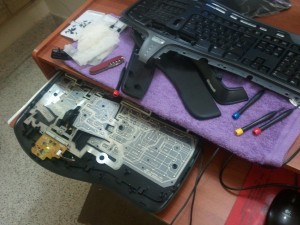
<figure style="float: right; margin: 0 20px 0 20px; width: 300px">

<img src="/blog/wp-content/uploads/2010/11/msne4k-300x225.jpg" width="300" height="225" />
<figcaption width="300">MSNE4K internals</figcaption>
</figure>

<p>First time it occured, I shook it, vacuumed it and it started working.
Second time it happened I opened it up I found snack fragments mostly
from <a href="https://en.wikipedia.org/wiki/Lays" title="Lays">Lays</a>. Cleaned it up
and it started functioning normally. Today its messed up the third time
and after an hour of moving the membrane around (or rather praying and
hoping it works) its working.</p>

<p>In case you have one of these and want to dissassemble here is the
thing: After all the screws on the bottom are removed, pull out the soft
wrist padding pieces. Then you'd find two more screws to be removed.
Then pry the space bar out (carefully) to find the two final smaller
screws.</p>

<p>I thought they would not screw hardware up and wished it was more
durable.</p>]]></content><author><name>{&quot;display_name&quot;=&gt;&quot;Anil&quot;, &quot;login&quot;=&gt;&quot;Anil&quot;, &quot;url&quot;=&gt;&quot;&quot;}</name></author><category term="Uncategorized" /><category term="Mostlywhine" /><category term="GeneralRant" /><category term="Microsoft" /><category term="Hardware" /><summary type="html"><![CDATA[I had bought two of those the Microsoft Natural® Ergonomic 4000 keyboards. The (newer) one at home has started failing. I'm guessing its part from all the button mashing games. The problem presented as spurious 'x' (like around 50 of them) coming in when the OS/Bios initialized the keyboard and then no more 'x', even when you type.]]></summary></entry><entry><title type="html">Madness is real.</title><link href="https://anil.net.in/blog/2010/05/madness-is-real.html" rel="alternate" type="text/html" title="Madness is real." /><published>2010-05-30T21:21:48+05:30</published><updated>2010-05-30T21:21:48+05:30</updated><id>https://anil.net.in/blog/2010/05/madness-is-real</id><content type="html" xml:base="https://anil.net.in/blog/2010/05/madness-is-real.html"><![CDATA[<p>I took the leap of faith, bought i7 930 based rig with insanely
expensive motherboard (ASUS P6T Deluxe v2). Linux is up with my old
installation with the following changes to kernel:</p>

<ul>
  <li>Add Yukon etherenet support (sky2.ko module).</li>
  <li>Add w83627ehf module for sensors.</li>
  <li>AHCI for disks (Which borked the windows 7 install; fixable by
<a href="http://support.microsoft.com/kb/922976">enabling ahci in windows</a>
registry)</li>
  <li>And ofcourse SMP (incase you did not have it).</li>
  <li>Proprietary nvidia drivers for the video card.</li>
</ul>

<p>Funny my DRAM speed went down to 1066 Mhz (from 1333) cant recollect
why. Now I've 'set' it to 1333.</p>]]></content><author><name>{&quot;display_name&quot;=&gt;&quot;Anil&quot;, &quot;login&quot;=&gt;&quot;Anil&quot;, &quot;url&quot;=&gt;&quot;&quot;}</name></author><category term="Uncategorized" /><category term="Linux" /><category term="Hardware" /><category term="squarehead" /><category term="upgrade" /><category term="corei7" /><category term="intel" /><summary type="html"><![CDATA[I took the leap of faith, bought i7 930 based rig with insanely expensive motherboard (ASUS P6T Deluxe v2). Linux is up with my old installation with the following changes to kernel:]]></summary></entry><entry><title type="html">BSNL changes.</title><link href="https://anil.net.in/blog/2010/05/bsnl-changes.html" rel="alternate" type="text/html" title="BSNL changes." /><published>2010-05-30T20:58:59+05:30</published><updated>2010-05-30T20:58:59+05:30</updated><id>https://anil.net.in/blog/2010/05/bsnl-changes</id><content type="html" xml:base="https://anil.net.in/blog/2010/05/bsnl-changes.html"><![CDATA[<p>BSNL cuts some customers over to some other network and stays silent.
Some folks with the 5X.XX.. IP addresses would have encountered PPPoE
auth failure unexpectedly with the 'usage' page telling that userid is
suspended. They might have moved it to the 117.XX. network where the
user id is of the form xx (xx being "ln" for Indiranagar, Bangalore)
and password is just "password". I wonder how they were expecting to
notify the users about this change since they dont have any
<a href="http://en.wikipedia.org/wiki/TR-069">ACS</a> or remote management stuff
setup.</p>]]></content><author><name>{&quot;display_name&quot;=&gt;&quot;Anil&quot;, &quot;login&quot;=&gt;&quot;Anil&quot;, &quot;url&quot;=&gt;&quot;&quot;}</name></author><category term="Leftbrain" /><category term="Broadband" /><category term="BSNL" /><category term="Internet" /><category term="ADSL" /><category term="Bangalore" /><summary type="html"><![CDATA[BSNL cuts some customers over to some other network and stays silent. Some folks with the 5X.XX.. IP addresses would have encountered PPPoE auth failure unexpectedly with the 'usage' page telling that userid is suspended. They might have moved it to the 117.XX. network where the user id is of the form xx (xx being "ln" for Indiranagar, Bangalore) and password is just "password". I wonder how they were expecting to notify the users about this change since they dont have any ACS or remote management stuff setup.]]></summary></entry><entry><title type="html">Active directory LDAP</title><link href="https://anil.net.in/blog/2009/12/active-directory-ldap.html" rel="alternate" type="text/html" title="Active directory LDAP" /><published>2009-12-30T22:07:20+05:30</published><updated>2009-12-30T22:07:20+05:30</updated><id>https://anil.net.in/blog/2009/12/active-directory-ldap</id><content type="html" xml:base="https://anil.net.in/blog/2009/12/active-directory-ldap.html"><![CDATA[<p>Did you know that connecting to port 3268 for LDAP gets you the Global
directory of an organisation and spares you the pain of hopping across
the directory servers of different domains in the organisation searching
for stuff.</p>]]></content><author><name>{&quot;display_name&quot;=&gt;&quot;Anil&quot;, &quot;login&quot;=&gt;&quot;Anil&quot;, &quot;url&quot;=&gt;&quot;&quot;}</name></author><category term="Leftbrain" /><category term="Windoze" /><summary type="html"><![CDATA[Did you know that connecting to port 3268 for LDAP gets you the Global directory of an organisation and spares you the pain of hopping across the directory servers of different domains in the organisation searching for stuff.]]></summary></entry><entry><title type="html">Kernel upgrade brownout #2</title><link href="https://anil.net.in/blog/2009/08/kernel-upgrade-brownout-2.html" rel="alternate" type="text/html" title="Kernel upgrade brownout #2" /><published>2009-08-17T22:50:08+05:30</published><updated>2009-08-17T22:50:08+05:30</updated><id>https://anil.net.in/blog/2009/08/kernel-upgrade-brownout-2</id><content type="html" xml:base="https://anil.net.in/blog/2009/08/kernel-upgrade-brownout-2.html"><![CDATA[<p>Continuation of the previous one.</p>

<p>The "M$ occassionally we make usefulstuff" keyboard is working fine
after foolishly attempt looking at <em>xev</em> output and modifying
/usr/share/X11/xkb/keycodes/evdev to map what I thought was the correct
codes. The wrong codes were due to my mixing the kbd driver and evdev
driver (for extended events aka fancy buttons). You get both if you
comment the kbd driver out (in xorg.conf) and add two evdev keyboards
(for me the event devices are event5 and event6). X not getting the
device from HAL automagically has something to do with the GDM kinda
session creation. I login to console and 'startx' - more digging
later.</p>

<p>The Caps to Control map that did not work in console (mentioned in
earlier post) was due to change in approach to doing it - Now you set
X-like option (XKBOPTIONS="ctrl:nocaps") in
/etc/default/console-setup.</p>

<p>I stumbled on another bug - apparently related to evdev driver or xorg -
the left arrown, down arrow and the 'end' key lose their 'repeat'
capability - Using the work around mentioned
<a href="https://bugs.launchpad.net/ubuntu/+source/synergy/+bug/281546">here</a>.</p>

<p>Compiz was crashing with :<br />
<code class="language-plaintext highlighter-rouge">terminate called after throwing an instance of 'std::logic_error'</code><br />
<code class="language-plaintext highlighter-rouge">what(): basic_string: :_S_construct NULL not valid</code>\</p>

<p>Googling indicated someone had gotten past the error by setting the LANG
variable - tried it and it worked (LANG=en_US.utf-8 for me.)</p>

<p>Still broken:</p>

<p>Mplayer playback acts funny - every 30 seconds to one minute it
apparently realizes it was slow and does a quick 'catching' up. No
clue on this one yet - VLC also acted in similar manner a couple of
times.</p>

<p>My "TyTN II - OpenSync - synce" setup is blown mostly by the python
upgrade. This is going to take quite some time to get back.</p>]]></content><author><name>{&quot;display_name&quot;=&gt;&quot;Anil&quot;, &quot;login&quot;=&gt;&quot;Anil&quot;, &quot;url&quot;=&gt;&quot;&quot;}</name></author><category term="Leftbrain" /><category term="Linux" /><category term="x11" /><category term="xorg" /><category term="keyboard" /><category term="Compiz" /><summary type="html"><![CDATA[Continuation of the previous one.]]></summary></entry><entry><title type="html">Kernel upgrade brownout #1</title><link href="https://anil.net.in/blog/2009/07/kernel-upgrade-brownout-1.html" rel="alternate" type="text/html" title="Kernel upgrade brownout #1" /><published>2009-07-05T13:45:44+05:30</published><updated>2009-07-05T13:45:44+05:30</updated><id>https://anil.net.in/blog/2009/07/kernel-upgrade-brownout-1</id><content type="html" xml:base="https://anil.net.in/blog/2009/07/kernel-upgrade-brownout-1.html"><![CDATA[<p>Roger Murtaugh: I'm too old for this <em>bleep</em> !<br />
The following are the issues (some are still at large):</p>

<p>Package changes:</p>

<ul>
  <li>acpid: Does not use /proc/acpi/event. Instead uses netlink to get
events. So new kernel needs new acpid.</li>
  <li>xargs: There was an old problem with xargs getting huge command
lines (was fixed many months ago). I still had the old version.</li>
</ul>

<p>Kernel:</p>

<ul>
  <li>RTC vanished: The module rtc-cmos is needed and nodes /dev/rtc -&gt;
/dev/rtc0 needed (major  = 253).</li>
  <li>Nvidia: Just like previously downloaded the package from nvidia.
Should work without problem.</li>
  <li>Keyboard: Okay this needs another paragraph.</li>
</ul>

<p>Keyboard issues: Ironically I thought of upgrading the kernel to get the
"<em>Microsoft Natural® Ergonomic 4000</em>" working with all those special
buttons. The pain started like this:</p>

<p>After configuring X display and first run - black screen nothing
happens. Well actually there is no crash. Incidentally the black screen
was just Nvidia's idea of a default surface for X (Instead of my
favorite X crosshatch pattern). The non-response is due to <em>new</em> X not
using hal for some reason to get te mouse and keyboard. HAL is working
fine lists all the devices (even the other half of  "<em>Microsoft
Natural® Ergonomic 4000</em>" with the fancy buttons) - X just does not get
it. Currently X is set to use the 'kbd' driver and evdev mouse (yeah,
funny - hal supposed to suggest 'evdev' for both keyboard and mouse).</p>

<p>Getting to use the keyboard in some is a relief after which surfaces
minor problems that have crept in. The remapping of CapsLock to Control
in console is gone (apparently the sed scrpt /etc/kbd/remap is not
working and resulting in some funny symbol like "keycode 58 =
CtrlL_Lock") - Left it at that for now - not much console usage once X
is working.</p>

<p>Keyboard issue did not stop. A good one came in. I see that the shell
pipe lines I make lose space after the '|' i.e (ls /foo |grep bar).
This was due to overlap of 'Right shift' while the '|' and <em>space</em>
keys are hit - so Shift-Space gives no space. After googling and
starting of with info from
<a href="http://pascal.tsu.ru/en/xkb/setup.html">http:/pascal.tsu.ru/en/xkb/setup.html</a>,
ended up in base.lst file. This file describes an option called
nbsp:none which when enabled causes any level of <em>modified</em> space key
appears as space. I'm sure this has broken something else somwhere -
I'll wait for it.</p>]]></content><author><name>{&quot;display_name&quot;=&gt;&quot;Anil&quot;, &quot;login&quot;=&gt;&quot;Anil&quot;, &quot;url&quot;=&gt;&quot;&quot;}</name></author><category term="Leftbrain" /><category term="Linux" /><category term="x11" /><category term="xorg" /><category term="keyboard" /><category term="kernel" /><summary type="html"><![CDATA[Roger Murtaugh: I'm too old for this bleep ! The following are the issues (some are still at large):]]></summary></entry></feed>