MQTT Display
I had been fooling around cheap
ESP8266 based modules.
Running HTTP server to do the network end of module. It never felt right
because it felt too heavy and clunky, the web server, often having
trouble with concurrent connections. However the combination of
Node-Red and MQTT really looks promising -
learned it from Peter Scargill's blog. I
used tuanpt/esp_mqtt and a Max
7219 based dot matrix
driver
on arduino to build an MQTT display. So it subscribes to topic like
/leddisp1/show and various kinds of messages (though I had originally
meant for it to show caller-id info for my wired phone).
::: {.wp-caption .aligncenter style=”width: 320px;”}
Display running :::
The board itself is a kludge and you'd find lot of connectors left open for experimentation. The ESP8266 module communicates with the Arduino Pro Mini clone (5V, 16 Mhz) via SPI with ESP acting as master (and does the clocking). You can see really ugly diode based level shifting, which did work on bread board prototype but broke on the PCB I made. The dot-matrix I've got display is a set of 6 daisy chained Max7219 based 8x8 single color displays.
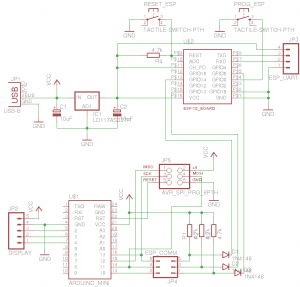
The display would show stuff you publish as payload on the topic
/leddisp1/show Also the payload has a format like ,, where m is
the number of seconds the display should be showing the message, n is
an option telling the display to scroll (when its value is "1") and
not to scroll (when its value is "0"). So you can do something like
the following on Linux:
bash$ mosquitto_pub -h MQTT-broker-hostname -p MQTT-port \
-m "5,1,Kake is a lie" -t /leddisp1/show
In my setup Node-Red and MQTT broker (mosquitto) run on a Raspberry-Pi, which felt just right. Although Node-Red is not really necessary it lets you wire the display up in crazy ways. For instance, couple of clicks and I had a the display showing current time.
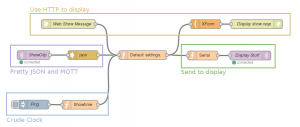
My 'test' flow is shown in the picture above. I've marked some 'sub-flows' like 'serializing' a JSON payload to the display's message format (mentioned above) marked in green. There is a pretty MQTT topic which accepts JSON payload. There is an HTTP element which you can use to display stuff by making a request like, say:
http://noderedhost:1880/dispshow?text=Aaappi&option=1
Since the picture itself does tell you whats inside the elements, I've pasted the flow aniline/led_display_flow.json
References, code and stuff.
- Tuan's MQTT library: tuanpmt/esp_mqtt
- Peter Scargill's blog: tech.scargill.net
- Code for Arduino part: aniline/arduino-sketchbook/mqtt_display
- Code for ESP part: aniline/esp_mqtt_display
- Schematic and board files: ESP-AVR-Display.zip
- Node-Red test flow: aniline/led_display_flow.json
Posts
- Window maker and dockapps nostalgia Jan 10, 2019
- Wifi CLIP Thingy Mar 5, 2016
- MQTT Display Jun 12, 2015
- First C program. Nov 20, 2013
- MSNE4K Fail. Nov 10, 2010
- Madness is real. May 30, 2010
- BSNL changes. May 30, 2010
- Active directory LDAP Dec 30, 2009
- Kernel upgrade brownout #2 Aug 17, 2009
- Kernel upgrade brownout #1 Jul 5, 2009